Building a Scheduled Data Sync in SAP CAP with node-cron and OData

Introduction
When building applications, you often need to keep data synchronized between different systems. Here we look at how to implement a bi-directional sync between SAP Cloud Application Programming (CAP) and an external OData service using node-cron for scheduled synchronization.
Original article available here.
Prerequisites
Ensure you have a development environment set up for CAP, described here.
Setting up the Project
Create a new CAP project and set up the basic structure.
cds init cron-integration
cd cron-integration
npm install axios
npm install dotenv --save-dev
We will use axios for making the REST calls and use dotenv for managing environment variables.
Soft Deletes + Scheduled Sync
The approach uses three key patterns:
Soft Deletes with MarkForDeletion: Instead of immediately deleting records, we mark them for deletion
Bi-Directional Sync: Changes flow both ways — CAP to remote and remote to CAP
Scheduled Jobs: node-cron runs the sync at regular intervals
CAP Implementation
Begin by setting up an entity in ./db/schema.cd as follows:
namespace com.cron;
entity Data {
	key ID:UUID;
	mxid:String;
	x:Integer;
	y:Integer;
	MarkForDeletion:Boolean default false;
}
The MarkForDeletion field is used to prevent the race conditions during synchronization.
Intercept OData DELETE Operations
Next edit ./srv/data-service.js and intercept the DELETE operation as follows:
const cds=require(’@sap/cds’);
module.exports=cds.service.impl(async function(){
 const {Data}=this.entities;
 this.before(’DELETE’,’Data’,async(req)=>{
  const {ID}=req.data;
  await UPDATE(Data)
   .set({MarkForDeletion:true})
   .where({ID:ID});
  req.reply();
 });
 this.on(’READ’,’Data’,async(req,next)=>{
  const result=await next();
  if(Array.isArray(result)){
   return result.filter(item=>!item.MarkForDeletion);
  }
  return result&&!result.MarkForDeletion?result:null;
 });
});
When an OData DELETE happens the record is marked as deleted, and when an OData READ occurs we filter out records marked for deletion from the result.
Next edit .envas follows:
CRON_STRING=* * * * *
REMOTE_ODATA_URL=http://192.168.0.31:8080/odata/published_odata_service_data/v1/Data
REMOTE_USERNAME=MxAdmin
REMOTE_PASSWORD=1
The scheduling library we will be using, node-cron, uses cron strings. You can find out more about cron strings here. Here are some example cron strings:
*/5 * * * *- Every 5 minutes0 * * * *- Every hour0 0 * * *- Daily at midnight
Next, edit srv/server.jsas follows:
require(’dotenv’).config();
const cds=require(’@sap/cds’);
const cron=require(’node-cron’);
const axios=require(’axios’);
const REMOTE_ODATA_URL=process.env.MENDIX_ODATA_URL;
const REMOTE_USERNAME=process.env.MENDIX_USERNAME;
const REMOTE_PASSWORD=process.env.MENDIX_PASSWORD;
const LOG=cds.log(’sync’);
async function fetchRemoteData(){
 try{
  const config={
   headers:{
    ‘Accept’:’application/json’
   }
  };
  if(REMOTE_USERNAME&&REMOTE_PASSWORD){
   config.auth={
    username:REMOTE_USERNAME,
    password:REMOTE_PASSWORD
   };
  }
  const response=await axios.get(REMOTE_ODATA_URL,config);
  return response.data.value||[];
 }catch(e){
  LOG.error(’Error fetching remote data:’,e.message);
  throw e;
 }
}
async function downSync(){
 try{
  const {Data}=cds.entities(’com.cron’);
  const remoteData=await fetchRemoteData();
  const capData=await SELECT.from(Data);
  const capDataMap=new Map(capData.map(item=>[item.mxid,item]));
  const remoteIds=new Set(remoteData.map(item=>String(item.mxid)));
  let insertCount=0;
  let updateCount=0;
  let hardDeleteCount=0;
  for(const remoteRecord of remoteData){
   const mxid=String(remoteRecord.mxid);
   const existingRecord=capDataMap.get(mxid);
   if(existingRecord){
    if(existingRecord.MarkForDeletion){
     continue;
    }
    if(existingRecord.x!==remoteRecord.x||existingRecord.y!==remoteRecord.y){
     await UPDATE(Data)
      .set({x:remoteRecord.x,y:remoteRecord.y})
      .where({ID:existingRecord.ID});
     updateCount++;
    }
   }else{
    await INSERT.into(Data).entries({
     mxid:mxid,
     x:remoteRecord.x,
     y:remoteRecord.y,
     MarkForDeletion:false
    });
    insertCount++;
   }
  }
  for(const capRecord of capData){
   if(capRecord.mxid&&!remoteIds.has(capRecord.mxid)&&!capRecord.MarkForDeletion){
    await UPDATE(Data)
     .set({MarkForDeletion:true})
     .where({ID:capRecord.ID});
   }
  }
  const markedRecords=await SELECT.from(Data).where({MarkForDeletion:true});
  for(const record of markedRecords){
   if(record.mxid&&!remoteIds.has(record.mxid)){
    await DELETE.from(Data).where({ID:record.ID});
    hardDeleteCount++;
   }
  }
  return {inserted:insertCount,updated:updateCount,deleted:hardDeleteCount};
 }catch(e){
  LOG.error(’Error in down sync:’,e);
  throw e;
 }
}
async function upSync(){
 try{
  const {Data}=cds.entities(’com.cron’);
  const capData=await SELECT.from(Data);
  const remoteData=await fetchRemoteData();
  const remoteDataMap=new Map(remoteData.map(item=>[String(item.mxid),item]));
  const capIds=new Set(capData.filter(item=>item.mxid&&!item.MarkForDeletion).map(item=>item.mxid));
  const config={
   headers:{
    ‘Content-Type’:’application/json’,
    ‘Accept’:’application/json’
   }
  };
  if(REMOTE_USERNAME&&REMOTE_PASSWORD){
   config.auth={
    username:REMOTE_USERNAME,
    password:REMOTE_PASSWORD
   };
  }
  let updateCount=0;
  let createCount=0;
  let deleteCount=0;
  let hardDeleteCount=0;
  for(const capRecord of capData){
   if(capRecord.MarkForDeletion&&capRecord.mxid){
    try{
     const deleteUrl=`${REMOTE_ODATA_URL}(${capRecord.mxid})`;
     await axios.delete(deleteUrl,config);
     deleteCount++;
     await DELETE.from(Data).where({ID:capRecord.ID});
     hardDeleteCount++;
    }catch(e){
     LOG.error(`Failed to delete record with mxid ${capRecord.mxid}:`,e.message);
    }
    continue;
   }
   if(!capRecord.mxid){
    try{
     const response=await axios.post(REMOTE_ODATA_URL,{
      x:capRecord.x,
      y:capRecord.y
     },config);
     const newMxid=String(response.data.mxid);
     await UPDATE(Data)
      .set({mxid:newMxid})
      .where({ID:capRecord.ID});
     createCount++;
    }catch(e){
     LOG.error(`Failed to create record for CAP ID ${capRecord.ID}:`,e.message);
    }
   }else if(remoteDataMap.has(capRecord.mxid)){
    try{
     const updateUrl=`${REMOTE_ODATA_URL}(${capRecord.mxid})`;
     await axios.patch(updateUrl,{
      x:capRecord.x,
      y:capRecord.y
     },config);
     updateCount++;
    }catch(e){
     LOG.error(`Failed to update record with mxid ${capRecord.mxid}:`,e.message);
    }
   }
  }
  for(const remoteRecord of remoteData){
   const mxid=String(remoteRecord.mxid);
   if(!capIds.has(mxid)){
    try{
     const deleteUrl=`${REMOTE_ODATA_URL}(${mxid})`;
     await axios.delete(deleteUrl,config);
     deleteCount++;
    }catch(e){
     LOG.error(`Failed to delete record with mxid ${mxid}:`,e.message);
    }
   }
  }
  return {created:createCount,updated:updateCount,deleted:deleteCount};
 }catch(e){
  LOG.error(’Error in up sync:’,e.message);
  throw e;
 }
}
async function performSync(){
 try{
  await upSync();
  await downSync();
 }catch(e){
  LOG.error(’Synchronization failed:’,e);
 }
}
cds.once(’bootstrap’,app=>{
 cron.schedule(process.env.CRON_STRING,async()=>{
  performSync();
 });
});
module.exports=cds.server;
When the app bootstraps, we schedule a cron job with a cron string from the .env file that calls performSync() .
In performSync() we first perform upSync() and then downSync() to handle local deletions first and avoid re-insertion of deleted records.
During upSync we delete marked records from the remote service, we create new CAP records in the remote service if the mxid field is null, we update existing remote records, and we delete the marked records in CAP.
During downSync we insert new remote records into CAP, update existing CAP records, we mark CAP records for deletion if they are missing from the remote service, and then delete the marked records from the remote service.
Remote Service
For testing purposes, I used Mendix for the remote service. Start by setting up a test entity as follows:

Test Entity
Here mxid will act as the key. You then set up an Overview page for the test entity as follows:
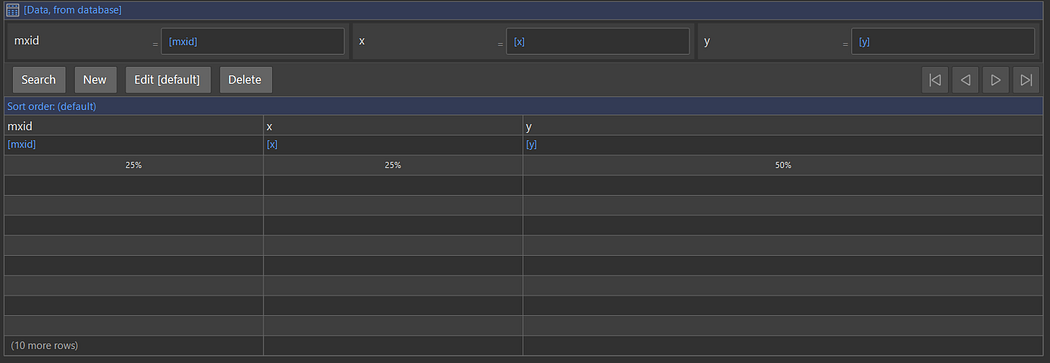
Overview Page
Next, set up a Published OData Service as follows:
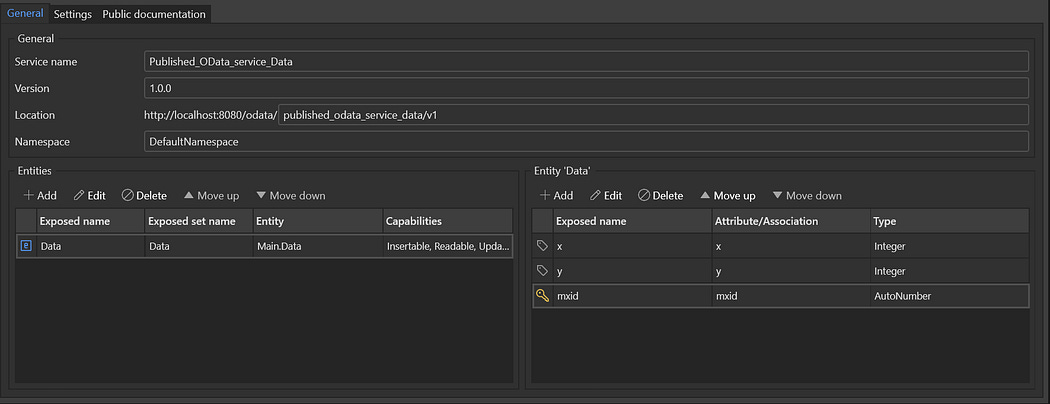
Published OData Service
Configure the resource settings as follows to allow for inserting, updating, and deleting:
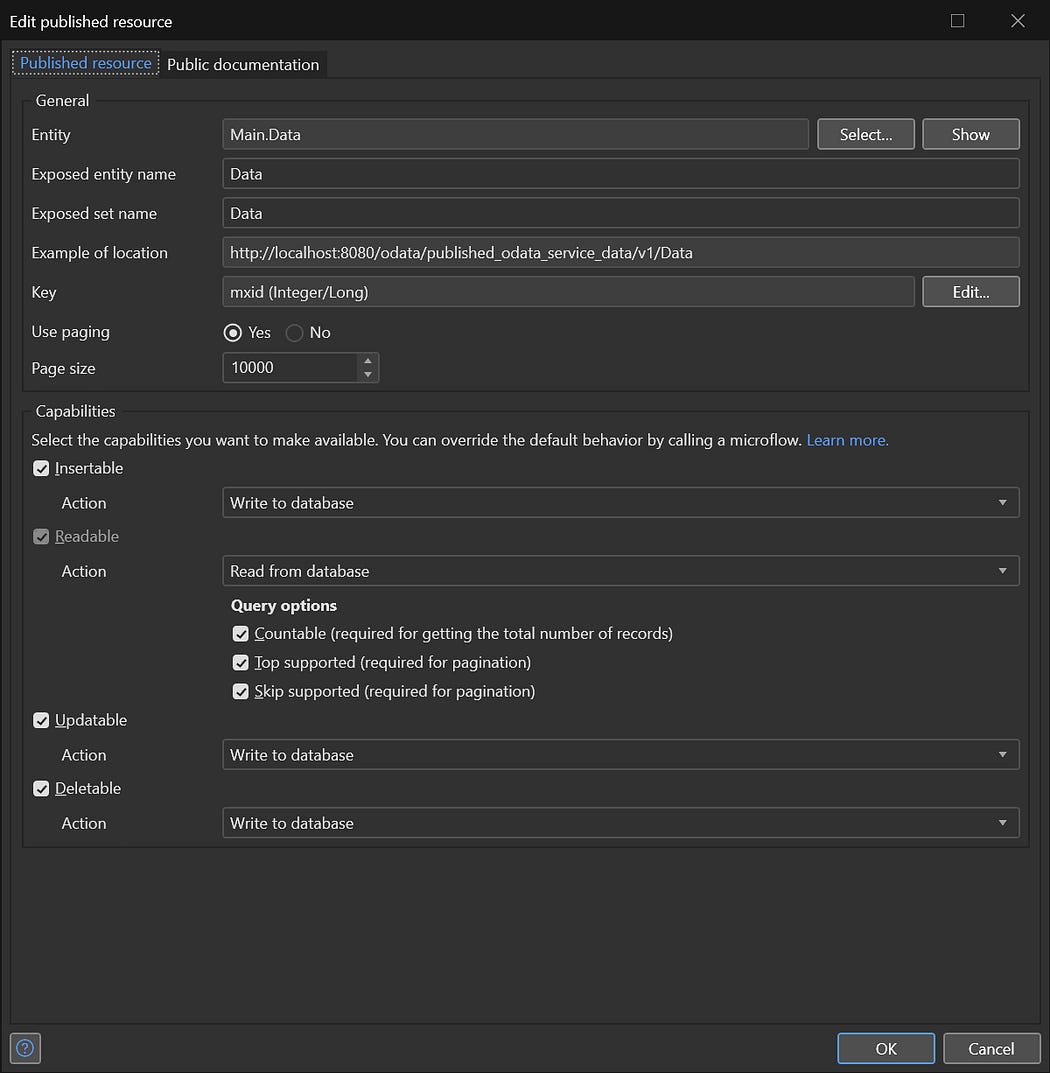
OData Resource Settings
Configure the Published OData Service authentication to use Username and Password authentication as follows:
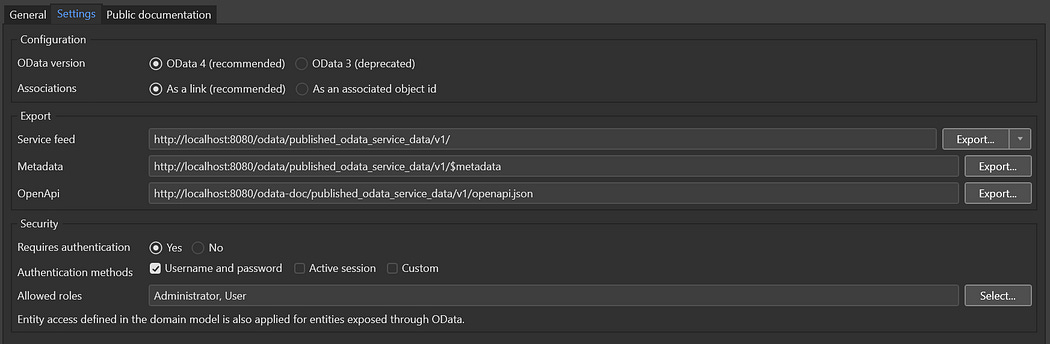
OData Settings
Now you should be able to test the scenario by running both the Mendix and CAP application and verify records remain synchronized by monitoring the Mendix overview page:
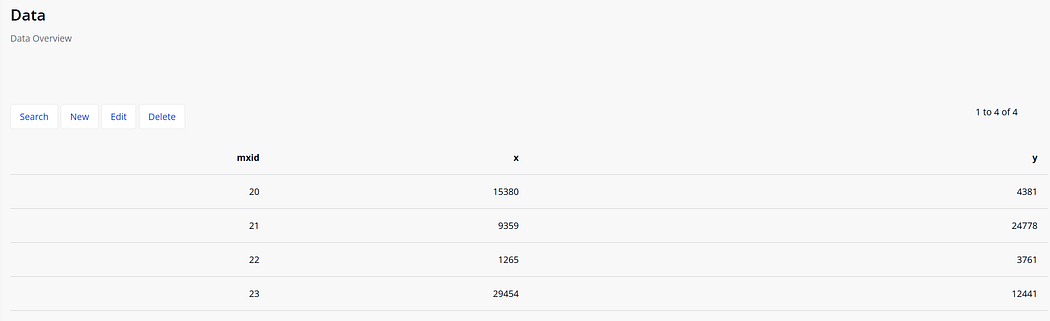
Rendered Overview Page
Deleting, editing, or creating an item on the overview page should be reflected in the CAP application after the synchronization job runs.
You can inspect the records in the CAP application using the following:
curl “http://localhost:4004/odata/v4/data/Data”Conversely, creating, editing, and deleting entities from CAP should be reflected in the Mendix application after the synchronization job runs.
You can create entities in the CAP application as follows:
curl -X POST http://localhost:4004/odata/v4/data/Data\
     -H “Content-Type: application/json” \
     -d ‘{
           “x”: ‘$RANDOM’,
           “y”: ‘$RANDOM’
         }’
You can update entities in the CAP application as follows:
#!/bin/bash
ID=$(curl “http://localhost:4004/odata/v4/data/Data” |jq ‘.value[0].ID’ -r)
X=$(curl “http://localhost:4004/odata/v4/data/Data” |jq ‘.value[0].x’ -r)
Y=$(curl “http://localhost:4004/odata/v4/data/Data” |jq ‘.value[0].y’ -r)
X=$((X + 1))
Y=$((Y + 1))
curl -X PATCH “http://localhost:4004/odata/v4/data/Data($ID)” \
     -H “Content-Type: application/json” \
     -d ‘{
           “x”: ‘$X’,
           “y”: ‘$Y’
         }’
The above script picks the first entity and increments the X and Y fields.
You can delete entities from the CAP application as follows:
#!/bin/bash
ID=$(curl “http://localhost:4004/odata/v4/data/Data” |jq ‘.value[0].ID’ -r)
curl -X DELETE “http://localhost:4004/odata/v4/data/Data($ID)”
The above script gets the first entity IDand deletes it.
Resources
SAP CAP Documentation:
https://cap.cloud.sap
node-cron:
https://nodecron.com/


Comments
Post a Comment