Deep Object Serialization in Mendix: Converting Complex Objects to JSON

Introduction
Mendix provides built-in JSON export capabilities through Export Mappings, but these require manual configuration and don’t handle complex object graphs automatically. When you need to serialize Mendix objects dynamically — including all their associations, references, and nested structures — a custom serialization approach becomes necessary. This article demonstrates how to build a Java Action that automatically serializes any Mendix object to JSON, handling references, reference sets, and circular dependencies.
The standard Mendix JSON export functionality requires pre-configured Export Mappings for each entity.
Here we look at a Java Action that automatically serializes any type of Mendix object to JSON, recursively follows references and reference sets, and handles circular references to prevent infinite loops.
This serialization can be used for Dynamic API Development, debugging, exporting data, and data migration.
Original aritcle here.
The Java Action
Create a Java Action named MxObjectToJSON with the following configuration:
Parameters:
obj(Object) - The Mendix object to serialize
Return Type: String (the JSON representation)
Here is the Java:
package mymodule.actions;
import com.mendix.systemwideinterfaces.core.IContext;
import com.mendix.webui.CustomJavaAction;
import com.mendix.systemwideinterfaces.core.IMendixObject;
import com.mendix.thirdparty.org.json.JSONObject;
import com.mendix.thirdparty.org.json.JSONArray;
import com.mendix.systemwideinterfaces.core.IMendixIdentifier;
import java.util.Map;
import java.util.HashMap;
import java.util.List;
import java.util.ArrayList;
/**
 * Serializes Mendix Object to JSON including all associations
 */
public class MxObjectToJSON extends CustomJavaAction<String>
{
    private final IMendixObject obj;
    public MxObjectToJSON(IContext context, IMendixObject obj) {
        super(context);
        this.obj = obj;
    }
    @Override
    public String executeAction() throws Exception {
        // BEGIN USER CODE
        JSONObject jsonObj = new JSONObject();
        Map<IMendixIdentifier, IMendixIdentifier> visited =
            new HashMap<IMendixIdentifier, IMendixIdentifier>();
        serialize(this.getContext(), obj, visited, jsonObj);
        return jsonObj.toString(2);
        // END USER CODE
    }
    @Override
    public String toString() {
        return “MxObjectToJSON”;
    }
    // BEGIN EXTRA CODE
    private void serialize(
        IContext ctx,
        IMendixObject obj,
        Map<IMendixIdentifier, IMendixIdentifier> visited,
        JSONObject jsonObj
    ) throws com.mendix.core.CoreException {

        // Get all members (attributes and associations) of the object
        Map<String, ?> members = obj.getMembers(ctx);

        // Prevent circular references - skip if already processed
        if (visited.containsKey(obj.getId())) {
            return;
        }
        visited.put(obj.getId(), obj.getId());

        // Iterate through all members
        for (String key : members.keySet()) {
            com.mendix.systemwideinterfaces.core.IMendixObjectMember<?> member =
                members.get(key);

            // Skip virtual attributes and auto-numbers
            if (member.isVirtual() ||
                member instanceof com.mendix.core.objectmanagement.member.MendixAutoNumber) {
                continue;
            }

            // Handle object references (many-to-one associations)
            if (member instanceof com.mendix.core.objectmanagement.member.MendixObjectReference
                && member.getValue(ctx) != null) {

                // Retrieve the referenced object
                IMendixIdentifier refId =
                    ((com.mendix.core.objectmanagement.member.MendixObjectReference) member)
                    .getValue(ctx);
                IMendixObject refObj = com.mendix.core.Core.retrieveId(ctx, refId);

                // Create nested JSON object
                JSONObject nestedJson = new JSONObject();

                // Validate all parameters before recursion
                if (ctx != null && refObj != null && visited != null && nestedJson != null) {
                    jsonObj.put(key, nestedJson);
                    serialize(ctx, refObj, visited, nestedJson);
                }
            }
            // Handle reference sets (one-to-many associations)
            else if (member instanceof com.mendix.core.objectmanagement.member.MendixObjectReferenceSet
                && member.getValue(ctx) != null) {

                JSONArray jsonArray = new JSONArray();
                jsonObj.put(key, jsonArray);

                com.mendix.core.objectmanagement.member.MendixObjectReferenceSet refSet =
                    (com.mendix.core.objectmanagement.member.MendixObjectReferenceSet) member;

                // Iterate through all objects in the reference set
                for (IMendixIdentifier itemId : refSet.getValue(ctx)) {
                    IMendixObject refObj = com.mendix.core.Core.retrieveId(ctx, itemId);
                    JSONObject itemJson = new JSONObject();
                    jsonArray.put(itemJson);

                    // Recursively serialize each object in the set
                    if (ctx != null && refObj != null && visited != null && itemJson != null) {
                        serialize(ctx, refObj, visited, itemJson);
                    }
                }
            }
            // Handle regular attributes (String, Integer, Boolean, etc.)
            else {
                Object value = member.getValue(ctx);
                jsonObj.put(key, value);
            }
        }
    }
    // END EXTRA CODE
}
The Algorithm
The serialization algorithm works as follows:
1. Initialization:
Create a root JSON object
Initialize a
visitedmap to track processed objectsStart recursive serialization
2. Circular Reference Prevention:
Before processing any object, check if its ID exists in the
visitedmapIf found, return immediately to prevent infinite recursion
If not found, add the ID to the map and continue
3. Member Processing:
Iterate through all object members (attributes and associations)
Skip virtual attributes and auto-numbers (these are computed, not stored)
Handle three member types differently:
4. Object References (Many-to-One):
Create a nested JSON object
Recursively serialize the referenced object
Add the nested object to the parent JSON
5. Reference Sets (One-to-Many):
Create a JSON array
Iterate through all referenced objects
Recursively serialize each object
Add all objects to the array
6. Regular Attributes:
Directly add primitive values to JSON
Handles String, Integer, Long, Boolean, Decimal, DateTime, etc.
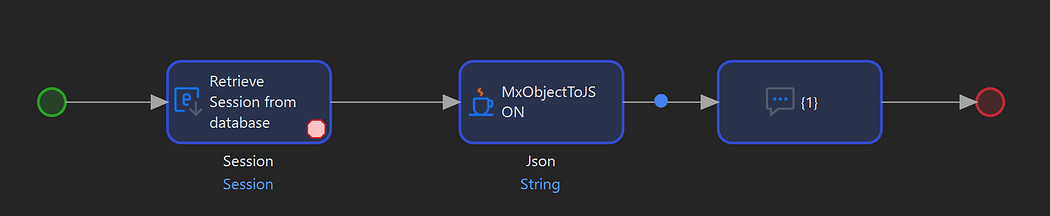
Test Microflow
Test Microflow
Create a test microflow that retrieves a Mendix Object such as System.Session and pass it into the JavaAction.
The JavaAction response should be similar to the following:
{
  “ReadOnlyHashKey”: “a2929632-8ed7-45fe-841c-ad5f09b82d9f”,
  “createdDate”: “Wed Jan 28 14:42:56 SAST 2026”,
  “CSRFToken”: “44ea44b4-e1e2-4152-8dff-11470ab4fc1d”,
  “LastActive”: “Wed Jan 28 14:52:16 SAST 2026”,
  “LongLived”: false,
  “System.Session_User”: {
    “WebServiceUser”: false,
    “System.User_Language”: {
      “Description”: “English, United States”,
      “Code”: “en_US”
    },
    “System.UserRoles”: {
      “ModelGUID”: “8dd52bfa-6d7e-453b-b506-303c0a3d9567”,
      “Description”: “”,
      “System.grantableRoles”: {
        “ModelGUID”: “9b91b34c-41c2-48cf-8264-9f71cb8281d8”,
        “Description”: “”,
        “System.grantableRoles”: [],
        “Name”: “Anonymous”
      },
      “Name”: “Administrator”
    },
    “Name”: “MxAdmin”,
    “changedDate”: “Fri Feb 21 00:03:13 SAST 2025”,
    “Active”: true,
    “createdDate”: “Fri Feb 21 00:03:13 SAST 2025”,
    “System.owner”: {},
    “LastLogin”: “Wed Jan 28 14:42:59 SAST 2026”,
    “IsAnonymous”: false,
    “FailedLogins”: 0,
    “Blocked”: false,
    “Password”: “{BCrypt}$2a$10$3eHHmlOnDIeHnLJng5bEKezK5wa6l5QwiEMyWPASh2o6PtR3pnHIy”
  },
  “SessionId”: “bb2d0b73-516b-4347-a715-756faf0ab177”
}
Note that the System.UserRoles subobject was also populated in the JSON output.
Advanced Features
Advanced features that were not implemented in this simple version include handling of FileDocuments, depth limiting, type metadata (Integer vs. Decimal), and rules and hints.


Comments
Post a Comment