Invoking Mendix /xas via curl

Introduction
The Mendix runtime exposes a REST endpoint at the /xas/ path that the Mendix client api uses for session management, retrieves, object creation, and microflow execution. Here we take a look at using curl to invoke these operations.
Original article available here.
Steps
For our examples, we will work with the following domain:
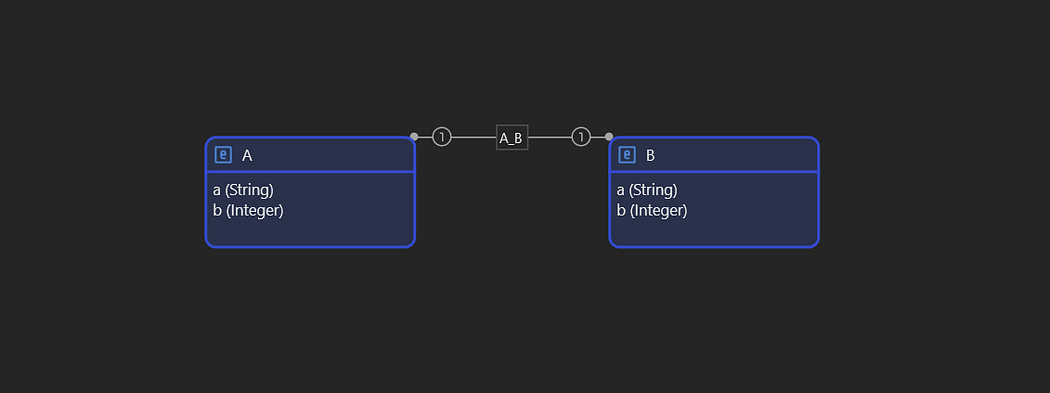
Simple Test Domain
Synopsis
Every request to /xas/ is an HTTP POST with a JSON body containing an action field and a params object. Also, the server uses cookie-based sessions, and after the initial handshake.
{
  “action”: “<action_name>”,
  “params”: { ... }
}
Inspecting the browser traffic you will also notice profiledata, which we can skip for our purposes.
If you want to try this out, start out by creating a script test.sh
#!/bin/bash
HOST=http://192.168.0.31:8081
USER=MxAdmin
PASS=1
COOKIE_FILE=$(mktemp)
SESSION_JSON=$(mktemp)
LOGIN_JSON=$(mktemp)
trap ‘rm -f “$COOKIE_FILE” “$SESSION_JSON” “$LOGIN_JSON”’ EXIT
Append the rest of the example snippets at the end of the file.
Starting a Session
Before logging in you must establish a session get the CSRF token:
curl -s -b “$COOKIE_FILE” -c “$COOKIE_FILE” “$HOST/xas/” \
  -X POST \
  -H ‘content-type: application/json’ \
  -H ‘x-mx-reqtoken: 1-0’ \
  --data-raw ‘{
    “action”: “get_session_data”,
    “params”: {
      “hybrid”: false,
      “offline”: true,
      “referrer”: null,
      “profile”: “”,
      “timezoneoffset”: -120,
      “timezoneId”: “Africa/Johannesburg”,
      “preferredLanguages”: [”en-US”, “en”],
      “version”: 2
    },
    “profiledata”: {”1-0”: 16}
  }’ | jq ‘.’ > “$SESSION_JSON”
CSRFTOKEN=$(jq -r ‘.csrftoken’ “$SESSION_JSON”)
Here CSRFTOKEN is extracted, We will use this in the subsequent calls.
Logging In
curl -s -b “$COOKIE_FILE” -c “$COOKIE_FILE” “$HOST/xas/” \
  -X POST \
  -H ‘content-type: application/json’ \
  -H “x-csrf-token: $CSRFTOKEN” \
  --data-raw ‘{
    “action”: “login”,
    “params”: {
      “username”: “’”$USER”’”,
      “password”: “’”$PASS”’”
    },
    “profiledata”: {}
  }’ | jq ‘.’ > “$LOGIN_JSON”
CSRFTOKEN=$(jq -r ‘.csrftoken’ “$LOGIN_JSON”)
Here we log in, and we get a new CSRF token, to use with the rest of the requests.
Instantiate and Committing Objects
Creating an object is a two-step process: first you perform ainstantiate operation to get a new object with a guid and hash, then you perform a commit operation to persist it to the database.
NEW_JSON=$(mktemp)
trap ‘rm -f “$NEW_JSON”’ EXIT
# Instantiate
curl -s -b “$COOKIE_FILE” -c “$COOKIE_FILE” “$HOST/xas/” \
  -X POST \
  -H ‘content-type: application/json’ \
  -H “x-csrf-token: $CSRFTOKEN” \
  --data-raw ‘{
    “action”: “instantiate”,
    “params”: { “objecttype”: “Main.A” }
  }’ | jq ‘.’ > “$NEW_JSON”
GUID=$(jq -r ‘.actionResult’ “$NEW_JSON”)
HASH=$(jq -r ‘.objects[0].hash’ “$NEW_JSON”)
# Commit
curl -s -b “$COOKIE_FILE” -c “$COOKIE_FILE” “$HOST/xas/” \
  -X POST \
  -H ‘content-type: application/json’ \
  -H “x-csrf-token: $CSRFTOKEN” \
  --data-raw ‘{
    “action”: “commit”,
    “params”: {
      “guids”: [”’”$GUID”’”]
    },
    “changes”: {
      “’”$GUID”’”: {
        “a”: { “value”: “def” },
        “b”: { “value”: “321” }
      }
    },
    “objects”: [
      {
        “objectType”: “Main.A”,
        “guid”: “’”$GUID”’”,
        “hash”: “’”$HASH”’”,
        “attributes”: {}
      }
    ]
  }’ | jq ‘.’
Your actual attribute values you want to set goes into the changes field.
Working with Associations
The same commit call can take multiple objects at the same time. Associations are set in changes just like regular attributes, using GUIDs.
A_JSON=$(mktemp)
B_JSON=$(mktemp)
trap ‘rm -f “$A_JSON” “$B_JSON”’ EXIT
# Instantiate A
curl -s -b “$COOKIE_FILE” -c “$COOKIE_FILE” “$HOST/xas/” \
  -X POST \
  -H ‘content-type: application/json’ \
  -H “x-csrf-token: $CSRFTOKEN” \
  --data-raw ‘{
    “action”: “instantiate”,
    “params”: { “objecttype”: “Main.A” }
  }’ | jq ‘.’ > “$A_JSON”
GUID_A=$(jq -r ‘.actionResult’ “$A_JSON”)
HASH_A=$(jq -r ‘.objects[0].hash’ “$A_JSON”)
# Instantiate B
curl -s -b “$COOKIE_FILE” -c “$COOKIE_FILE” “$HOST/xas/” \
  -X POST \
  -H ‘content-type: application/json’ \
  -H “x-csrf-token: $CSRFTOKEN” \
  --data-raw ‘{
    “action”: “instantiate”,
    “params”: { “objecttype”: “Main.B” }
  }’ | jq ‘.’ > “$B_JSON”
GUID_B=$(jq -r ‘.actionResult’ “$B_JSON”)
HASH_B=$(jq -r ‘.objects[0].hash’ “$B_JSON”)
# Commit both, setting attributes and association A -> B
curl -s -b “$COOKIE_FILE” -c “$COOKIE_FILE” “$HOST/xas/” \
  -X POST \
  -H ‘content-type: application/json’ \
  -H “x-csrf-token: $CSRFTOKEN” \
  --data-raw ‘{
    “action”: “commit”,
    “params”: {
      “guids”: [”’”$GUID_A”’”, “’”$GUID_B”’”]
    },
    “changes”: {
      “’”$GUID_A”’”: {
        “a”: { “value”: “hello” },
        “b”: { “value”: “123” },
        “Main.A_B”: { “value”: “’”$GUID_B”’” }
      },
      “’”$GUID_B”’”: {
        “a”: { “value”: “world” },
        “b”: { “value”: “456” }
      }
    },
    “objects”: [
      {
        “objectType”: “Main.A”,
        “guid”: “’”$GUID_A”’”,
        “hash”: “’”$HASH_A”’”,
        “attributes”: {}
      },
      {
        “objectType”: “Main.B”,
        “guid”: “’”$GUID_B”’”,
        “hash”: “’”$HASH_B”’”,
        “attributes”: {}
      }
    ]
  }’ | jq ‘.’
Retrieve by Path
Once objects with an association are committed you can traverse the association using retrieve_by_path. The direction follows where the association is defined: forward goes from the owner to the target, reverse goes the other way. Here we use a forward direction for our simple one-to-one association.
# Forward: starting from A, follow Main.A_B to get B
curl -s -b “$COOKIE_FILE” -c “$COOKIE_FILE” “$HOST/xas/” \
  -X POST \
  -H ‘content-type: application/json’ \
  -H “x-csrf-token: $CSRFTOKEN” \
  --data-raw ‘{
    “action”: “retrieve_by_path”,
    “params”: {
      “id”: “’”$GUID_A”’”,
      “path”: “Main.A_B”,
      “entity”: “Main.B”,
      “direction”: “forward”
    },
    “changes”: {},
    “objects”: []
  }’ | jq ‘.’
Note that the path parameter is specified as MODULE.ASSOCIATION.
Retrieving by XPath
This is used often in Mendix. Here is an example of how to do that:
curl -s -b “$COOKIE_FILE” -c “$COOKIE_FILE” “$HOST/xas/” \
  -X POST \
  -H ‘content-type: application/json’ \
  -H “x-csrf-token: $CSRFTOKEN” \
  --data-raw ‘{
    “action”: “retrieve_by_xpath”,
    “params”: {
      “xpath”: “//Main.A[a = ‘\’‘def’\’‘]”,
      “schema”: { “offset”: 0, “amount”: 50 },
      “count”: true
    },
    “profiledata”: {}
  }’ | jq ‘.’
Set count: true to include the total number of matching objects alongside the page. To paginate through all results loop on offset until the returned objects array is empty.
Retrieving by ID
When you already have a guid, retrieve_by_ids is the most direct way to fetch an object:
curl -s -b “$COOKIE_FILE” -c “$COOKIE_FILE” “$HOST/xas/” \
  -X POST \
  -H ‘content-type: application/json’ \
  -H “x-csrf-token: $CSRFTOKEN” \
  --data-raw ‘{
    “action”: “retrieve_by_ids”,
    “params”: {
      “ids”: [”’”$GUID”’”],
      “schema”: {}
    }
  }’ | jq ‘.’
Delete
Pass one or more GUIDs to remove objects:
curl -s -b “$COOKIE_FILE” -c “$COOKIE_FILE” “$HOST/xas/” \
  -X POST \
  -H ‘content-type: application/json’ \
  -H “x-csrf-token: $CSRFTOKEN” \
  --data-raw ‘{
    “action”: “delete”,
    “params”: {
      “guids”: [”’”$GUID”’”, “’”$GUID_A”’”, “’”$GUID_B”’”]
    },
    “changes”: {},
    “objects”: []
  }’ | jq ‘.’
Execute a Microflow
curl -s -b “$COOKIE_FILE” -c “$COOKIE_FILE” “$HOST/xas/” \
  -X POST \
  -H ‘content-type: application/json’ \
  -H “x-csrf-token: $CSRFTOKEN” \
  --data-raw ‘{
    “action”: “executeaction”,
    “params”: {
      “actionname”: “MyModule.ProcessNewOrders”
    },
    “changes”: {},
    “objects”: [],
    “context”: []
  }’ | jq ‘.’
If the microflow takes an object parameter, pass its guid in context and echo the object in objects:
--data-raw ‘{
    “action”: “executeaction”,
    “params”: {
      “actionname”: “MyModule.ApproveOrder”
    },
    “changes”: {},
    “objects”: [
      {
        “objectType”: “Main.A”,
        “guid”: “’”$GUID”’”,
        “hash”: “’”$HASH”’”,
        “attributes”: {}
      }
    ],
    “context”: [”’”$GUID”’”]
  }’
Logging Out
Always close the session when you are done otherwise you will run out of sessions when running locally:
curl -s -b “$COOKIE_FILE” -c “$COOKIE_FILE” “$HOST/xas/” \
  -X POST \
  -H ‘content-type: application/json’ \
  -H “x-csrf-token: $CSRFTOKEN” \
  --data-raw ‘{
    “action”: “logout”,
    “params”: {},
    “profiledata”: {}
  }’ | jq ‘.’

Comments
Post a Comment